Siteo Tööaeg · time tracking

Hours worked on site, not logged from home

Workers start and finish their working day on their phone with one button. You see in real time who is on site and how many hours have been worked. If a day was finished away from the site, you get a notification straight away.

Price
€3 per worker a month + VAT
Trial
14 days free
For workers
invite link, nothing to install
Output
monthly timesheet to Excel

No card needed. Workers don't install anything: send a link to their phone and they're ready.
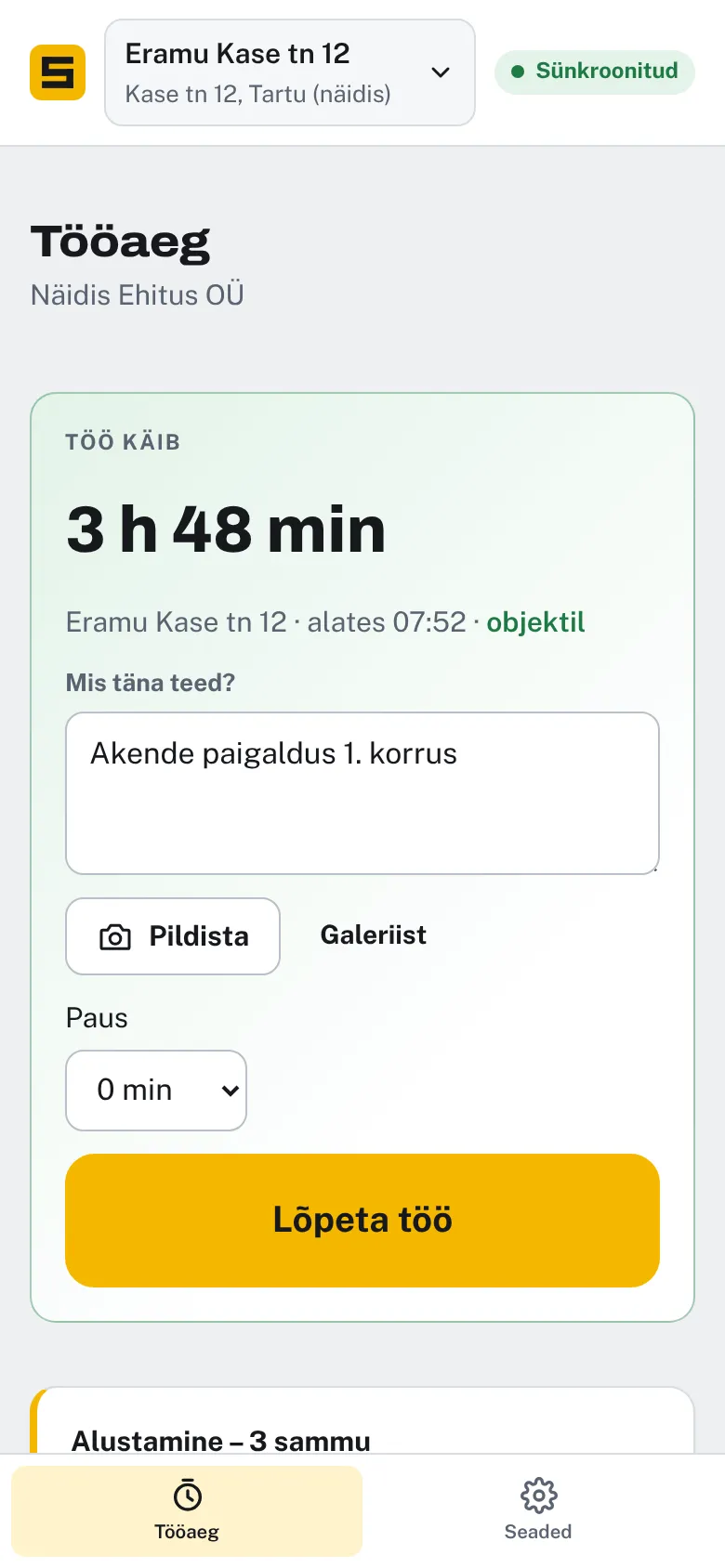
Time tracking on a worker's phone: work in progress, on site, Finish work button

Six things that end paper timesheets and mental arithmetic

01

One button

Start and finish. The worker adds what they did today.

02

Location check

Location is saved when work starts and ends. No continuous tracking.

03

Live view for managers

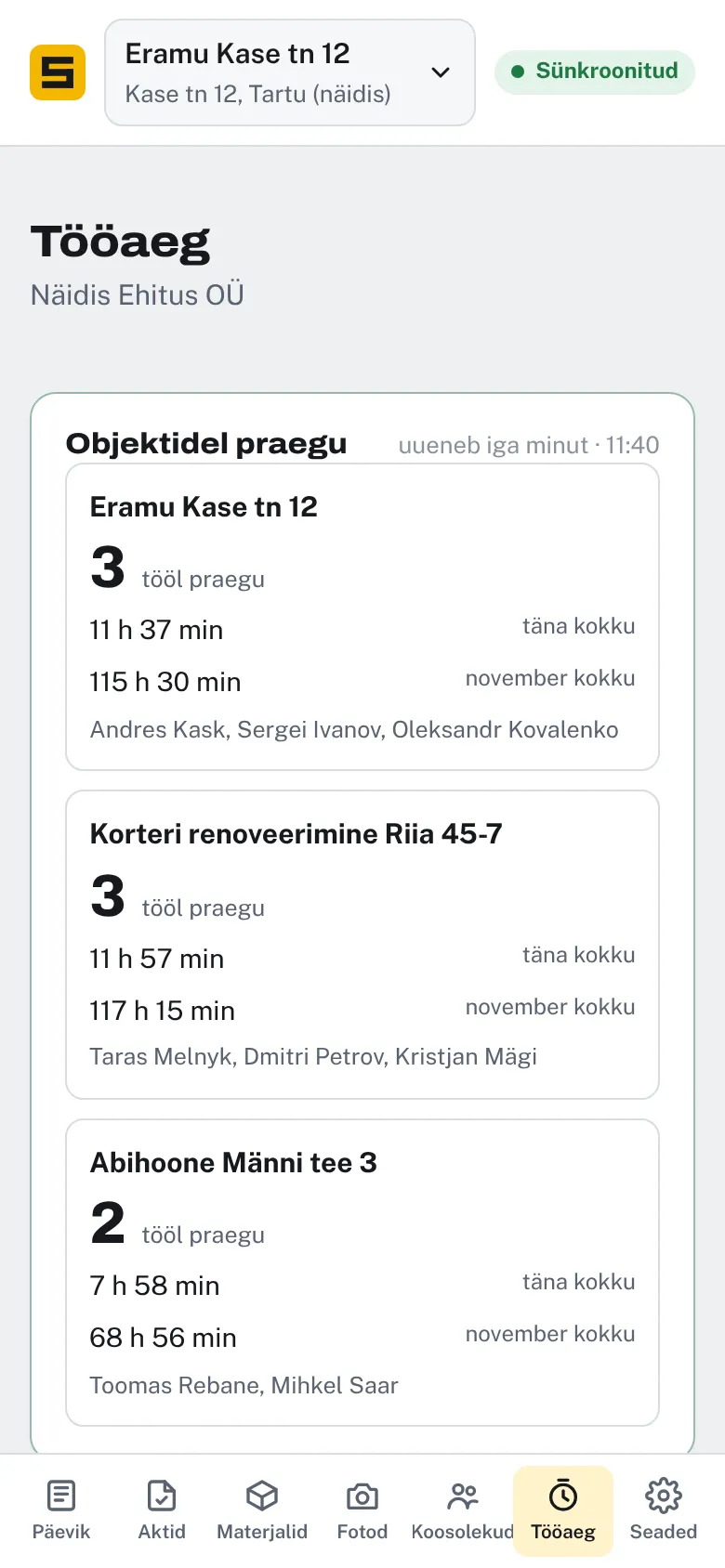
How many people are on site now, hours today and this month by site.

04

Approve and correct

The site manager approves hours. Corrections are kept with the reason.

05

To Excel

Monthly timesheet for payroll with one button.

06

Linked to the diary

If you also use the Siteo site diary, labour and work done go there automatically.

For site managers

All sites on one screen

  • How many people are working on each site right now.
  • Hours today and this month by site.
  • A flag and an email if a day ended far from the site.
Time tracking, site manager view: three sites and how many people are working now

Four steps, about ten minutes

01

Add a site

Address and name. Location comes from the map.

02

Send the invite link

Workers open the link on their phone and create an account. Nothing to install.

03

“Start” in the morning

“Finish” in the evening and a few words on what was done.

04

Timesheet at month end

The site manager approves the hours and exports them to Excel in one click.

Exactly what happens with location

Location is a sensitive subject, and workers shouldn't be kept in the dark about it. Here is exactly what is saved and what isn't.

Saved

Using the browser link, only two points a day: where the day started and where it ended. In the Android app (coming soon), also the times the worker left the site during working hours and came back.

Not saved

Continuous movement or routes. Location is not tracked outside working hours.

What the manager sees

Whether start and finish were within the site area. If not, a flag and an email.

Employer's duty

Tell workers what is saved before you start using it. This is processing of personal data and workers have the right to know what is collected.

Choose what suits you

All plans are free for 14 days. No card needed to start.

Time tracking only
Time tracking
€3 per worker a month + VAT
  • Start and finish with one tap
  • Location check
  • Notification if a day ended elsewhere
  • Monthly timesheet to Excel
  • No site diary needed
Try 14 days free
Most popular
Up to 10 workers and a diary for 5 sites
Time tracking + diary
€19 + VAT a month
  • Time tracking for up to 10 workers
  • Site diary and covered-work certificates
  • Hours and work descriptions flow into the diary
  • Dictate the day (AI)
Try 14 days free
Unlimited workers and sites
Time tracking + diary Pro
€39 + VAT a month
  • Unlimited time tracking
  • Unlimited sites and users
  • List of required certificates from the design's explanatory note (AI)
  • Priority support
Try 14 days free

With 7 or more workers, the €19 plan is cheaper than time tracking alone, as the site diary is included. With KuluFlow: €35 (up to 10 workers) or €55 a month + VAT.

Marko Toomik

I built Siteo around what a site actually needs. I worked as a site manager for eight years, and we use these tools ourselves every day.

Marko Toomik, Normrise OÜ. A real person answers, usually the same day: info@seadusta.ee

✓ Estonian company✓ Data stored in Estonia✓ No card needed for the trial✓ Small changes made free of charge

Frequently asked questions

Does the worker need to install an app?

No. Send them the invite link, they open it on their phone and can start straight away. If you also want to see when a worker left the site during working hours, they use the Android app (coming soon to Google Play).

Does it work without internet?

Yes. Start and finish are saved on the phone and sent when the signal returns.

What if a worker forgets to finish?

The site manager corrects the time. The original time is kept along with who corrected it and why.

Do I have to use the site diary?

No. Time tracking is a separate app and a separate plan. If you also use the diary, labour and work done go there automatically.

How do hours get to payroll?

The monthly timesheet goes to Excel with one button: workers, days, hours and sites.

What language do workers see?

Estonian, Russian, Ukrainian or English. Each worker picks their own.

See what a month at a construction company looks like

The demo company has 3 sites, 8 workers and 4 weeks of work. Click around freely – everything resets every night.